A meet runs on several devices at once, and each one does a different job. When a device joins, it picks a role. That choice decides which screen it gets, what it is allowed to do, and which part of a finished result it is responsible for.
Roles belong to devices, not people. Nobody has an account type or a permanent title. A volunteer who leaves in the middle of the meet hands their phone or their position to someone else, and a device timing lane 4 early on can be the camera later in the day.
This article is the map: who owns what, and where the work goes when you are short-handed. Each role has its own article with the actual how-to, linked below.
The roles at a glance
| Role | Where it stands | What it owns |
|---|---|---|
| Coordinator | Mostly at home, before the meet | Setup, roster, the optional heat sheet, and opening the meet |
| Starting Line | The chute and the gun | Building heats, sending them out, firing them |
| Finish Line | One per lane, at the line | Capturing the time in its lane |
| Photo Finish | Mounted on the finish line | Capturing and reading the whole line at once |
| Record Keeper | Anywhere with a view of the meet | Fixing, settling, and finalizing results |
You will not use all five at every meet. Which ones you fill depends on how many people showed up and how the times need to hold up, which is what three ways to run a meet walks through.
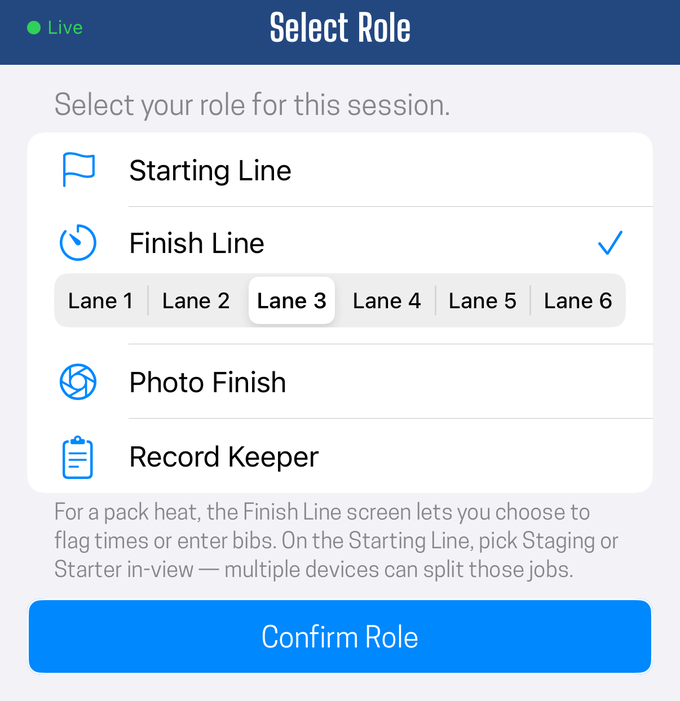
Coordinator is not on that list because it is not a choice: the device that opened the meet holds it.
Sub-roles
Three of those roles cover two distinct jobs, and the app lets you split them. These are sub-roles: not something you join as, but a choice made on the screen once the device is already in the meet.
| Sub-roles of | Split into | Why you would split it |
|---|---|---|
| Starting Line | Staging, Starter | One person works the chute while another works the gun |
| Photo Finish | Capture, Bib Collector | The camera stays mounted while a person walks the finish chute |
| Finish Line (pack heats only) | Flag Times, Bib Recording | One person keeps tapping while another sorts out who is who |
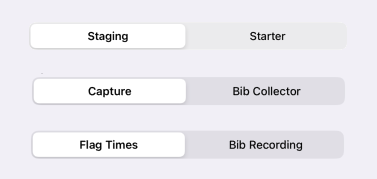
The pattern is the same in all three: one job stays with the timing, and the other handles identity or preparation. One person can hold both sub-roles and flip between them at a small meet. At a busy one, two devices each take a sub-role and neither waits on the other.
What each role owns
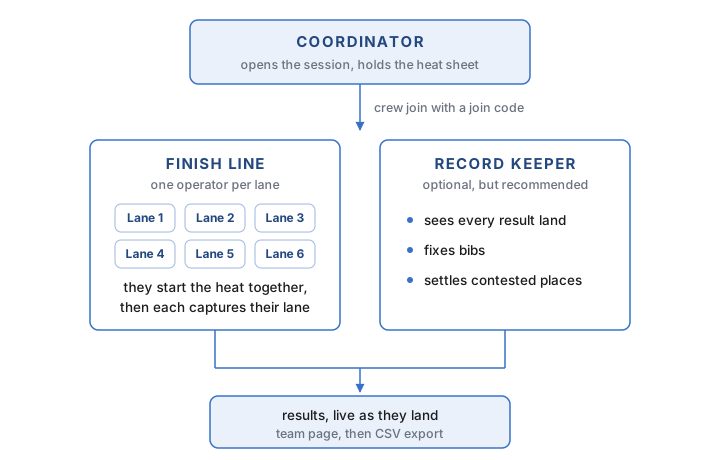
Coordinator
The one role whose work mostly happens before anybody arrives at the track: setting up events and age groups, building the roster, scheduling the meet, and optionally preparing a heat sheet. Every other role exists only while a meet is live.
On the day, it opens the meet, hands out the join code that lets every other device in, and admits them. After that its remaining job is amendments: a scratch, a late entry, or a heat nobody planned for. Nothing prepared in advance is binding.
It is also the only role that needs a subscription. Everyone else joins with a code, as themselves, with no sign-up, on whatever phone is in their pocket.
Full job, from setup through closing the meet out: the coordinator. The heat sheet is optional and covered in set up a heat sheet.
Starting Line
Everyone at the start joins in this role, then picks a sub-role. The two are deliberately kept apart, because building a heat and firing one are different jobs with different rhythms: staging works ahead of the track, and the starter works on it.
- Staging sets the event, gender, and age group, fills the lanes, and sends heats out, working several heats ahead so the next race is already built when the track clears. It never fires the gun. See stage heats ahead of the race.
- Starter arms the heat at the front of the queue and fires it, by tapping or by letting the device hear the gun itself. It holds one armed heat at a time, which is how the app knows which heat a gunshot belongs to, and it never edits rosters. See the starter.
Finish Line
One device per lane, standing at the line. It says which lane it is on when it joins, and that is what sends the right athlete to its screen. In a lane heat the job is one tap: capture the moment your runner crosses, confirm the bib, record the place the judge called, and send it. See the finish timer.
In a pack heat there are no lanes, so this role splits into two sub-roles on the pack finish screen: Flag Times taps each crossing and never touches a bib, and Bib Recording attaches bibs to those crossings afterward. Bib Recording is the same chute position as the photo-finish Bib Collector, doing the same work for a different capture method. See run a pack heat and collecting bibs in lane heats vs. pack heats.
Photo Finish
One device, mounted and aimed at the line, replacing every lane timer at once. Its two sub-roles really are better on separate devices, because one is bolted in place and the other has to walk.
- Capture is the mounted camera. It photographs the line continuously, and the operator afterward reads the strip and marks each crossing. Bibs fill in from the lane assignments, so this operator never types a bib number. There is deliberately only one capture station in a meet, so there is never a question about where a time came from. See how the photo finish camera works.
- Bib Collector is the position at the finish chute. The camera cannot read a bib, so a person stands where the runners come to a stop and sorts out who was who: fixing a bib the roster could not identify, photographing the finishers, and catching the runner in the wrong lane or with no bib at all. In a lane heat the bibs were assigned before the gun, so this device spends the race calling the finishing order instead, which is what keeps the strip marking fast.
The camera gets you the time; the chute gets you the name. That is why an accuracy-first crew is still two people rather than one.
Record Keeper
Watches results land for the whole meet, and is the only role that can settle them:
- Fixes a bib that is wrong or missing, including attaching an athlete to a time that finished with no name on it.
- Changes a place, either one lane at a time or by re-ranking a whole heat by its times. Both are deliberate calls, and neither happens on its own. See the finish timer for when each one is the right answer.
- Reviews a photo-finish strip and republishes the times from its own device.
- Finalizes a heat. No other role can.
If no separate record keeper has joined, the coordinator is holding this job. That is the normal arrangement at a small meet.
Only the record keeper finalizes
When the starting line advances past a heat, that heat leaves the start-line screen and keeps collecting results everywhere else. Advancing clears the chute. It does not close the heat.
The heat stays open until the record keeper finalizes it. This is what keeps the start line from ever being stuck holding a heat open because one finish timer has not reported yet, and it is why the chute can stay several heats ahead of the track.

The finish crew changes size with the heat style
Most meets run both styles, and the finish crew is a different size in each. A lane heat needs one device per lane, so six or eight people. A pack heat needs two, whatever the field size: one flagging times, one collecting bibs.
Nobody has to change roles for this. When a pack heat is sent out, every Finish Line device swaps its lane screen for the pack screen by itself and the sub-role selector appears. Two operators pick Flag Times and Bib Recording. The rest simply have nothing to pick.
So during a pack heat, most of your lane crew is free. The distance events are the longest races on the schedule and the ones where volunteers most want a few minutes, and they are also exactly the events that need the fewest people. Let them step away for the 1600 and come back for the sprints.
Two things to hold onto:
- They have to actually come back, and a device rejoining a heat already in progress has to tap Ready to take its lane again.
- A photo-finish crew does not change size at all. The camera reads the whole line in either style. Capture plus a bib collector is two people for the sprints and the same two for the 3200, which is a large part of why an accuracy-first crew is the easier one to staff across a mixed schedule.
Rules that apply to every role
Readiness tells the crew something, it never blocks anything. Tapping Ready says your position is covered. A heat can still be armed and fired whether or not you tapped it, so if the gun goes while you are not ready, just capture.
The app never has to approve something before it happens on the track. If the starter raises the gun, the race goes, whatever any screen says. Every part of the timing system is built to catch up to what really happened.
Capture first, sort it out second. Every role is built so that an unknown bib, a missing place, or a runner nobody recognizes is a normal thing to record rather than a reason to stop. A time you never captured cannot be recovered. Everything else can be fixed afterward from the record keeper's device.
Every device keeps its own times. A time is saved to the device that captured it before anything is sent over the network, so a dropped signal costs you live updates rather than results.
Changing roles and sub-roles
A role is picked when the device joins, and it is not locked in for the season. A volunteer who has to leave can hand off their position, and a device can take a different role between heats.
A sub-role is lighter than that. It is a selector on a screen the device is already looking at, so switching between Staging and Starter, or between Capture and Bib Collector, takes one tap and does not involve rejoining anything. That is what makes it practical for one person to cover both jobs at a small meet.
The one thing to be careful about is leaving a position uncovered rather than changing it. An unmanned lane should look unmanned, which is why a device joining a heat that is already running has to tap Ready to take the lane rather than silently appearing covered.
Working with fewer people than positions
Real meets are short-staffed. The order to give things up in:
- The separate record keeper. The coordinator keeps the record instead.
- The sub-role split at the start. One person flips between Staging and Starter on one device.
- The per-lane finish crew. Switch to photo finish plus a bib collector, which trades six or eight volunteers for two and improves accuracy at the same time.
- Lanes themselves. Run pack heats where the event allows it: one person tapping crossings, one collecting bibs afterward.
Notice that the bib collector survives every one of those cuts. It is the last position to give up, not the first, because a time with no name on it is the one gap the record keeper cannot close alone.
The one job you cannot combine away is capturing the finish. Everything else has slack. See how many devices do I need.
Did this answer your question? If something here is wrong, missing, or out of date, tell us at support@finishlinetimer.com and we’ll fix it.